
Report overview
Report header
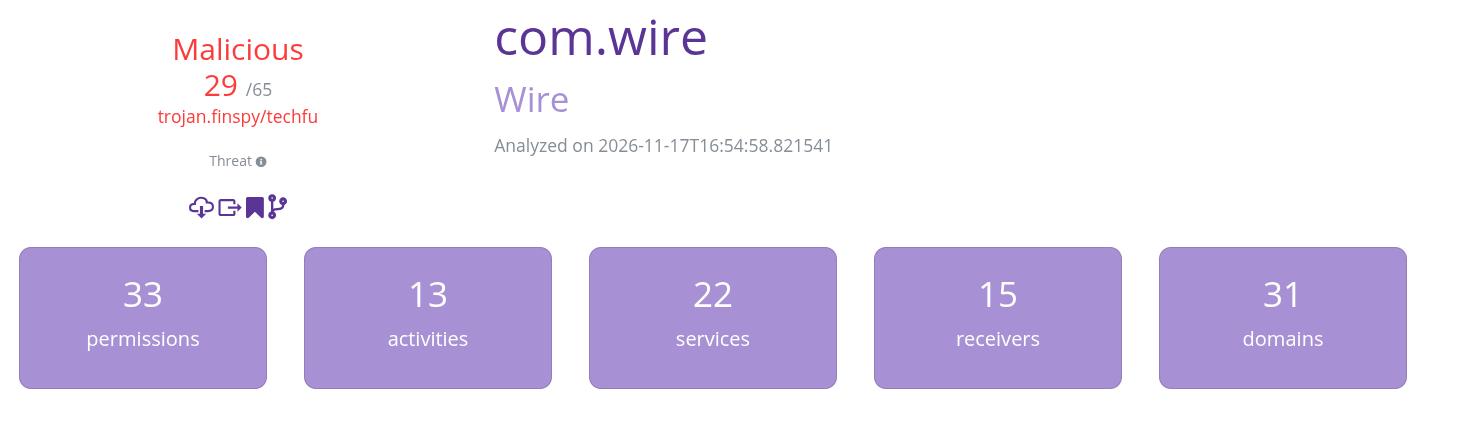
Section titled “Report header”The report header gives a quick summary of the information reported through the analysis.
APK name
Section titled “APK name”In the top middle of the screen are shown the name and package name of the analyzed APK file. Right underneath is the date of the analysis.
Threat summary
Section titled “Threat summary”On the top left side of the screen is the estimated threat level. This data is computed by VirusTotal, MalwareBazaar and Quark-Engine. When malicious samples are detected, it is clearly displayed, with the number of anti-virus flagging it. The threat summary also displays the most probable threat name.
Action buttons
Section titled “Action buttons”Under the threat summary are for buttons, they are only available when logged in to the instance. They allow multiple actions, from left to right:
- download sample: allows the user to download the original APK that was submitted for this analysis.
- export to JSON: get a JSON object containing all the report information, this can also be obtained through the API.
- bookmark: allows to bookmark the sample, it will then show up in your workspace.
- comparison: allows to compare the current report to another sample’s report using their sha256 hash.
Report stats
Section titled “Report stats”At the bottom, five cards display quick stats about the sample, from left to right:
- Permissions: the number of permissions the application declares and asks for.
- Activities: the number of activities declared by the application.
- Services: the number of services declared by the application.
- Receivers: the number of receivers declared by the application.
- Domains: the number of domain names found in the application code, those are some of the network endpoints the application communicates with.
Report tabs
Section titled “Report tabs”Underneath the header are the report tabs, each of those display various information about the APK.

Fingerprints
Section titled “Fingerprints”This tab is dedicated to information identifying the application, this is where hashes and fuzzy hashes are.
Threat Intel
Section titled “Threat Intel”This tab is dedicated to threat intelligence information, where similar malicious sample, yara detection, and anti-virus detction are displayed.
APK Analysis
Section titled “APK Analysis”This tab is dedicated to information about the packaging of the application.
Code Analysis
Section titled “Code Analysis”This tab is mostly for application developper and reverse engineers, listing vulnerabilities present in the application and detecting potentially risky code.
Behavior Analysis
Section titled “Behavior Analysis”This tab is dedicated to information about the application’s behavior, listing permissions, trackers, interesting and dangerous behaviors from the code.
Control Flow Analysis
Section titled “Control Flow Analysis”This tab shows control flow graphs of interesting and suspicious code paths.
Network Analysis
Section titled “Network Analysis”This tab is dedicated to information regarding the application usage of network communications.